Overview
Oceanpayment supports over 500 payment products on the Shopify platform, enabling seamless integration between merchants and global consumers, and is committed to creating a one-stop cross-border payment solution and service!
Installation
📝Quick integration can be achieved through the official Shopify installation address.
Integration Payments
https://apps.shopify.com/multiple-payments
コンビニ/銀行振込
https://apps.shopify.com/shopify-application-309
Credit / Debit Card - Mint
https://apps.shopify.com/credit-debit-card-mint
Tarjeta de crédito / débito
https://apps.shopify.com/tarjeta-de-credito-debito
Cartão de Crédito
https://apps.shopify.com/cartao-de-credito
FPS
Alipay
https://apps.shopify.com/alipay-2
Alipay HK
https://apps.shopify.com/alipay-hk
WeChat Pay
https://apps.shopify.com/wechat-pay
UnionPay
https://apps.shopify.com/unionpay
Skrill
https://apps.shopify.com/skrill
EPS
Bancontact
https://apps.shopify.com/bancontact-payments
iDEAL
https://apps.shopify.com/ideal
Boleto
https://apps.shopify.com/boleto-bancario-1
OXXO
POLi
MyBank
https://apps.shopify.com/mybank
przelewy24
https://apps.shopify.com/przelewy24
Atome
https://apps.shopify.com/atome-1
Trustly
https://apps.shopify.com/trustly
PIX
https://apps.shopify.com/pix-2
Blik
BPI
DANA
GCash
https://apps.shopify.com/gcash-oceanpayment
Rabbit Line Pay
https://apps.shopify.com/rabbit-line-pay
TrueMoney Pay
https://apps.shopify.com/truemoney-pay-oceanpayment
간편결제
https://apps.shopify.com/nhn-kcp
신용카드
https://apps.shopify.com/kor-ewallet-oceanpayment
계좌이체
https://apps.shopify.com/oceanpayment-4
Touch n Go
https://apps.shopify.com/touch-n-go-oceanpayment
BOCPay
https://apps.shopify.com/bocpay
YunShanFu
https://apps.shopify.com/yunshanfu-oceanpayment
VNM LPM
https://apps.shopify.com/vnm-lpm
Malaysia Bank
https://apps.shopify.com/malaysia-bank-oceanpayment
Thailand Bank
https://apps.shopify.com/thailand-bank-oceanpayment
Philippines Bank
https://apps.shopify.com/philippines-bank-oceanpayment
Brazil OnlineBank
https://apps.shopify.com/brazil-onlinebank-oceanpayment
Thailand Cash
https://apps.shopify.com/thailand-cash-oceanpayment
Malaysia Cash
https://apps.shopify.com/malaysia-cash-oceanpayment
Cherry Credits
https://apps.shopify.com/cherry-credits-oceanpayment
OneCard
https://apps.shopify.com/onecard-oceanpayment
RazerGold
https://apps.shopify.com/razergold-oceanpayment
GrabPay(MY)
https://apps.shopify.com/grabpay-oceanpayment
GrabPay(SG)
https://apps.shopify.com/oceanpayment-grabpay
PaySafeCard
https://apps.shopify.com/paysafecard-oceanpayment
RazerPin
https://apps.shopify.com/razerpin-oceanpayment
Servipag
https://apps.shopify.com/servipag-oceanpayment
Colombia Bank
https://apps.shopify.com/colombia-online-banking
Peru Cash
https://apps.shopify.com/peru-cash-oceanpayment
Sencillito
https://apps.shopify.com/sencillito-oceanpayment
Davivienda
https://apps.shopify.com/davivienda-oceanpayment
Vietnam Bank
https://apps.shopify.com/vietnam-bank-oceanpayment
L.Pay
https://apps.shopify.com/l-pay-oceanpayment
SSGPay
https://apps.shopify.com/ssgpay-oceanpayment
Payco
https://apps.shopify.com/payco-oceanpayment
NaverPay
https://apps.shopify.com/naverpay-oceanpayment
SamsungPay
https://apps.shopify.com/samsungpay-oceanpayment
Kakao Pay
https://apps.shopify.com/kakao-pay-oceanpayment
SEPA
https://apps.shopify.com/sepa-oceanpayment
Vietnam Debit Card
https://apps.shopify.com/vietnam-debit-card
Akulaku
https://apps.shopify.com/akulaku-oceanpayment
Boost
https://apps.shopify.com/boost-oceanpayment
9Pay
https://apps.shopify.com/9pay-oceanpayment
OVO
https://apps.shopify.com/ovo-oceanpayment
LinkAja
https://apps.shopify.com/linkaja-oceanpayment
JeniusPay
https://apps.shopify.com/jeniuspay-oceanpayment
Multicaja
https://apps.shopify.com/multicaja-oceanpayment
Efecty
https://apps.shopify.com/efecty-oceanpayment
DCEP
https://apps.shopify.com/oceanpayment-dcep
Naverpoint
https://apps.shopify.com/oceanpayment-naverpoint
MOX Instalment
https://apps.shopify.com/mox-instalment
LIVI Instalment
https://apps.shopify.com/livi-instalment
SCB Instalment
https://apps.shopify.com/scb-instalment
HSBC Instalment
https://apps.shopify.com/hsbc-instalment
Octopus
https://apps.shopify.com/oceanpayment-octopus
Tosspay
https://apps.shopify.com/oceanpayment-tosspay
ZIP
https://apps.shopify.com/oceanpayment-zip
DuitNow
https://apps.shopify.com/oceanpayment-duitnow
PayNow
https://apps.shopify.com/oceanpayment-paynow
ShopeePay
https://apps.shopify.com/oceanpayment-shopeepay
Duitnow online banking/Wallets
https://apps.shopify.com/duitnow-online-banking-wallets
PromptPay QR
https://apps.shopify.com/oceanpayment-promptpay-qr
Prompt Pay Request to Pay
https://apps.shopify.com/prompt-pay-request-to-pay
Mandiri VA
https://apps.shopify.com/oceanpayment-mandiri-va
Gopay
https://apps.shopify.com/oceanpayment-gopay
Alfamart
https://apps.shopify.com/oceanpayment-alfamart
Indomaret
https://apps.shopify.com/oceanpayment-indomaret
SCB
https://apps.shopify.com/scb-easy-net
Krungsri
https://apps.shopify.com/krungsri-online-banking
Kplus
https://apps.shopify.com/kpluskasikorn-bank
Bangkok
https://apps.shopify.com/bangkok-bank-e-payment
QRIS
PermataVA
https://apps.shopify.com/permatava
MaybankVA
https://apps.shopify.com/maybankva
CIMBVA
https://apps.shopify.com/cimbva
BRIVA
https://apps.shopify.com/briva
BNIVA
https://apps.shopify.com/bniva
PayU
https://apps.shopify.com/oceanpayment-payu
Paysera
https://apps.shopify.com/oceanpayment-paysera
Multibanco
https://apps.shopify.com/oceanpayment-multibanco
MBWay
https://apps.shopify.com/oceanpayment-mbway
Open banking
https://apps.shopify.com/open-bankingpaybybank
Swish
https://apps.shopify.com/oceanpayment-swish
Affirm
https://apps.shopify.com/oceanpayment-affirm
ACH
https://apps.shopify.com/oceanpayment-ach
Tabby
https://apps.shopify.com/klarna-for-us-app
Tamara
https://apps.shopify.com/klarna-for-eu-app
PayPay
https://apps.shopify.com/oceanpayment-przelewy24ng
Configuration Information
- Fill in the configuration information provided by Oceanpayment: Terminal, SecureCode, and save.
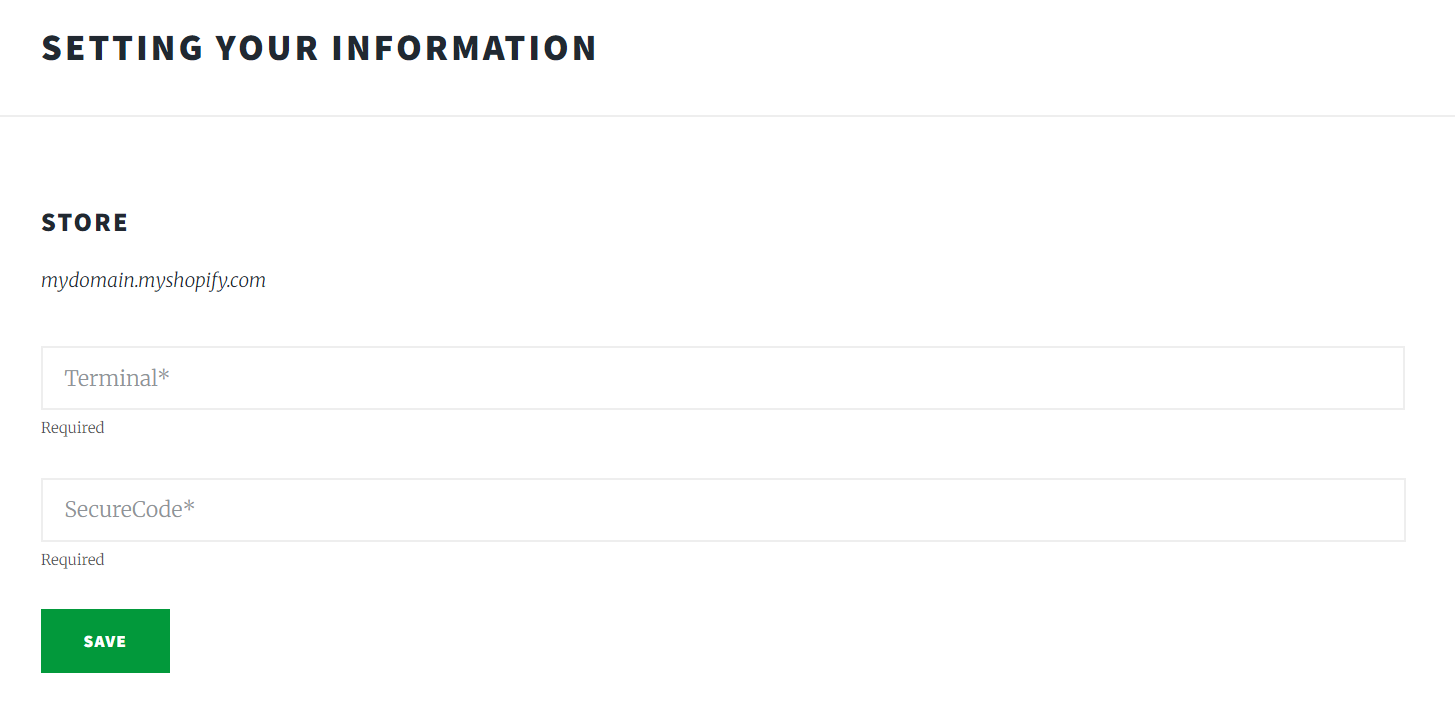
Environmental Description
- Do not select "Test mode"; otherwise, the test environment will be submitted.

Authorization Function
- Default: Automatic authorization at checkout, If you require manual authorization, contact Oceanpayment support.
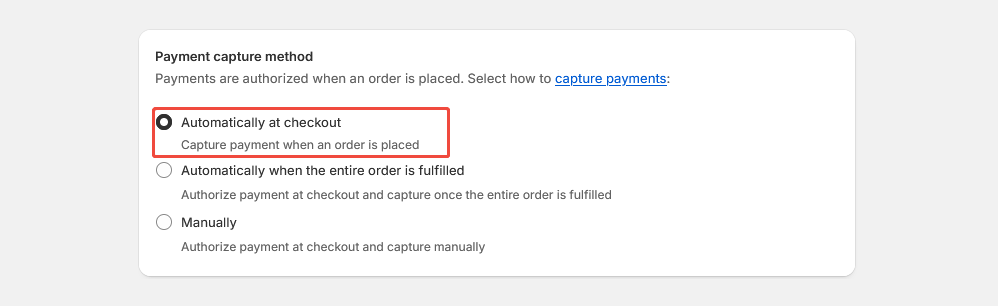
- The default setting for transactions is automatic authorization: [Payment capture method] - [Automatically at checkout]. In this case, pre-authorized orders need to be authorized in the Oceanpayment account backend.
- When you set a transaction to manual authorization: 【Payment capture method】-【Manually】, the pre-authorized order will need to be authorized in the Shopify backend.
Uninstall
- In Settings - Payments, find the payment method you want to uninstall and click Deactivate.