Overview
MCP (Model Context Protocol) is an open protocol that enables AI agents (such as Cursor, Claude Code, Codex, and VS Code) to access external services through standardized tool calls. For merchants, once Oceanpayment MCP is integrated, AI agents can query Oceanpayment account and transaction data within the authorized scope.
Oceanpayment MCP Service
- Service endpoint (default):
https://checkout.oceanpayment.com/mcp
- Authentication: MCP key (API key), created in the Oceanpayment account dashboard.
- Currently available tool: Transaction query.
Transaction Query Tool
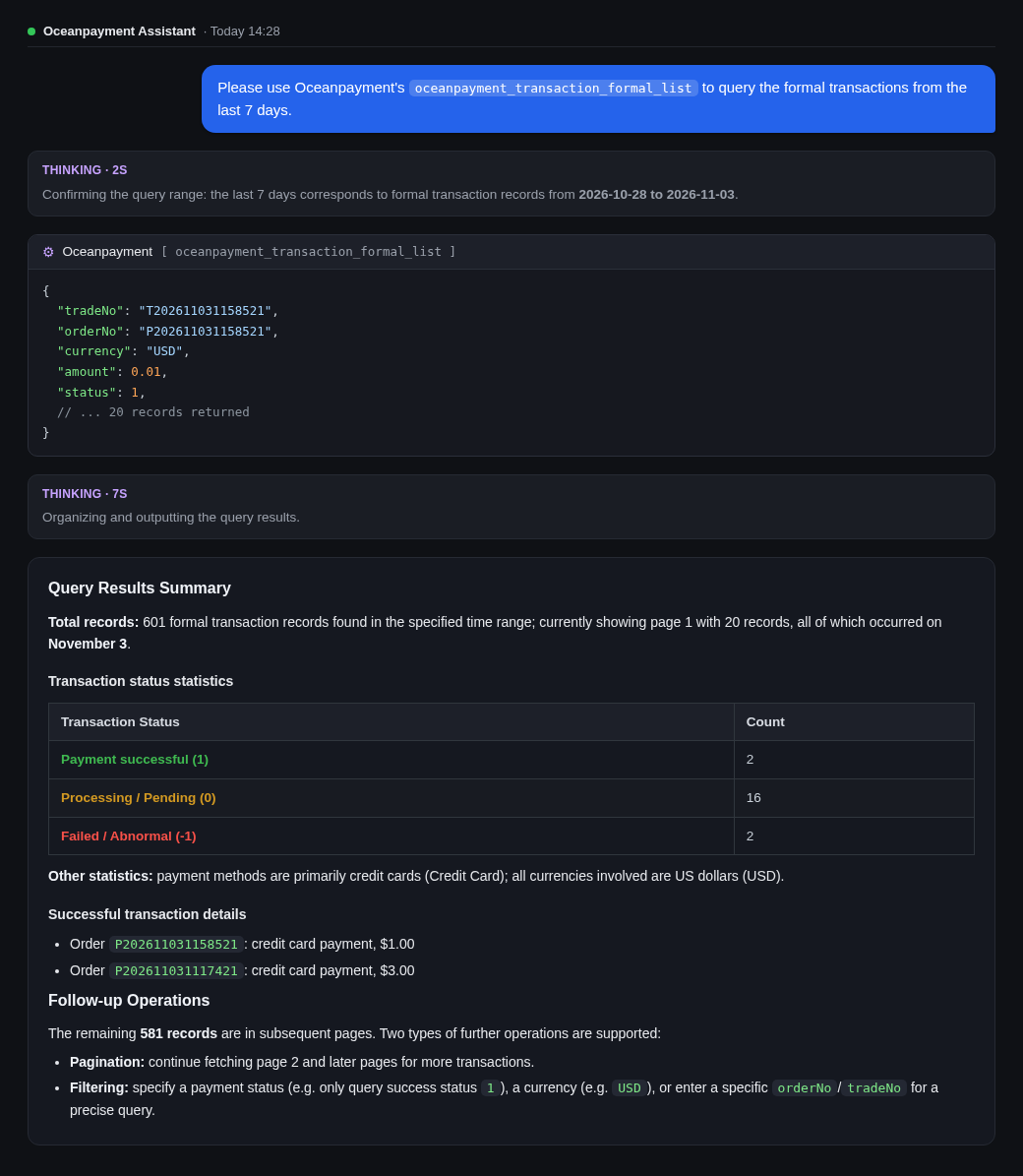
The Transaction Query tool is read-only and low-risk. It supports paginated queries of production transaction records that the merchant associated with the current MCP key and the user are authorized to access. It helps agents query transaction statuses and details within the merchant’s authorized scope, for use cases such as reconciliation, customer support investigations, and transaction data verification.
Prerequisites
Before integration, make sure you have:
- A registered Oceanpayment merchant account with developer access to the account dashboard (and access to Developer → MCP Key Management).
- An AI client that supports remote HTTP MCP, such as Cursor, Claude Code, Codex, or VS Code.
- Identified the tools to authorize. Currently, only the Transaction Query tool is available.
MCP Key Management
Create an MCP Key
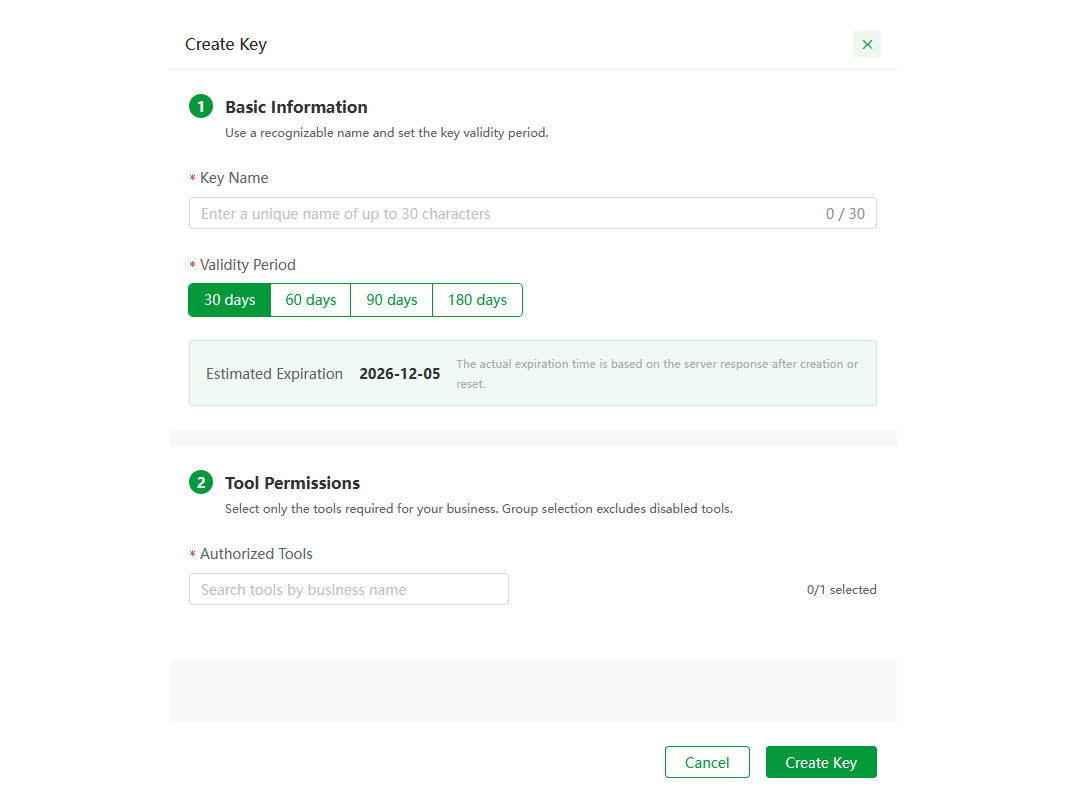
An MCP key is an authentication credential for Oceanpayment MCP. Create it in the account dashboard: Log in to the account dashboard → Developer → MCP Key Management → Create Key.
Configuration Options
Configure the following options when creating a key:
| Option | Required | Description |
|---|---|---|
| Key name | Required | A name for easy identification, up to 30 characters. |
| Validity period | Required | Choose 30, 60, 90, or 180 days. The default is 30 days. The key must be reset after it expires. The actual expiration time is the time returned by the server after successful creation or reset. |
| Authorized tools | Required | Select Production Transaction Query (labeled Low risk, read-only). Select only the tools required for your business. |
After the key is created, it is displayed only once. Store it securely. The key is bound to the current merchant and user, and the agent can access production transaction data only within the scope associated with that key.
Connect to the MCP Server
Endpoint
Use the following endpoint when adding a remote MCP service in your client:
https://checkout.oceanpayment.com/mcp
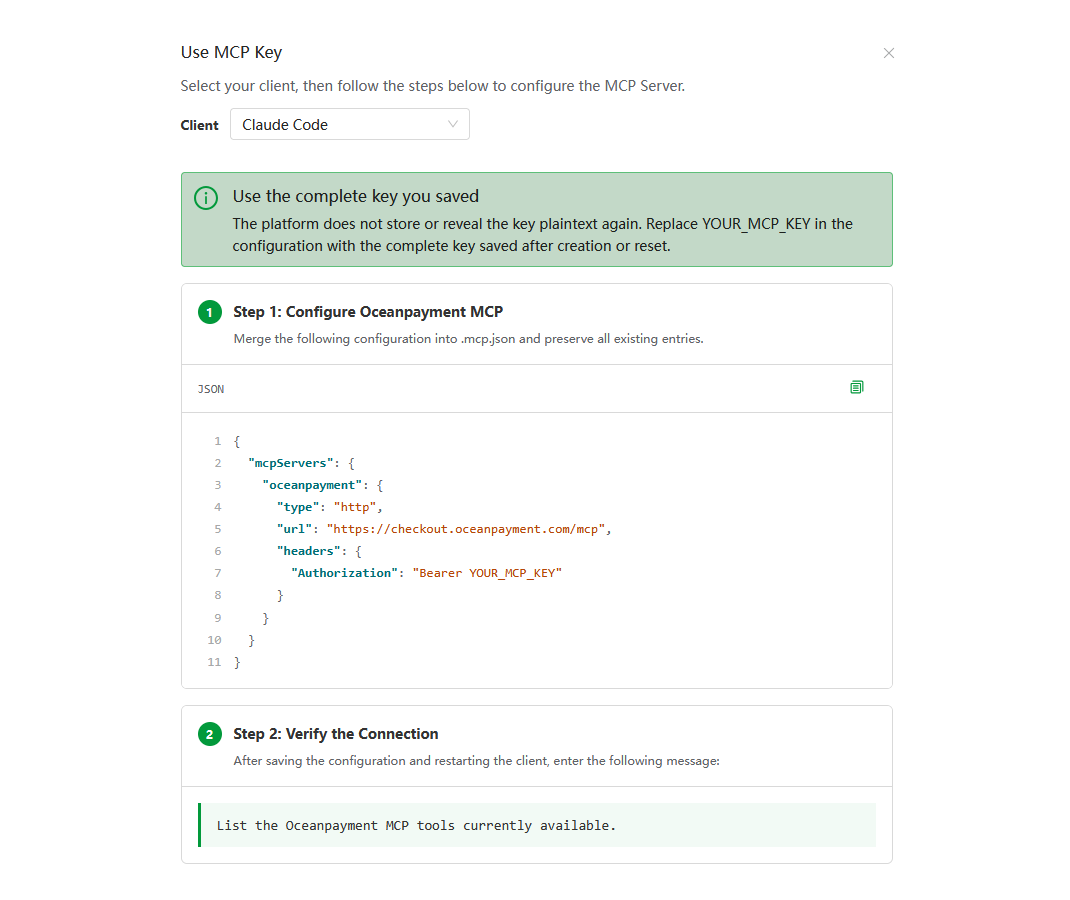
Using Claude Code as an example
Configuration Examples for Different Clients
- Codex
- Claude Code
- OpenCode
- WindSurf
- VSCode
- CodeBuddy
- Qwen
- Gemini
- Cline
- RooCode
- Kiro
codex mcp add oceanpayment --url https://checkout.oceanpayment.com/mcp
{
  "mcpServers": {
    "oceanpayment": {
      "type": "http",
      "url": "https://checkout.oceanpayment.com/mcp",
      "headers": {
        "Authorization": "Bearer YOUR_MCP_KEY"
      }
    }
  }
}
{
  "$schema": "https://opencode.ai/config.json",
  "mcp": {
    "oceanpayment": {
      "type": "remote",
      "url": "https://checkout.oceanpayment.com/mcp",
      "enabled": true,
      "headers": {
        "Authorization": "Bearer YOUR_MCP_KEY"
      }
    }
  }
}
{
  "mcpServers": {
    "oceanpayment": {
      "serverUrl": "https://checkout.oceanpayment.com/mcp",
      "headers": {
        "Authorization": "Bearer YOUR_MCP_KEY"
      }
    }
  }
}
{
  "servers": {
    "oceanpayment": {
      "type": "http",
      "url": "https://checkout.oceanpayment.com/mcp",
      "headers": {
        "Authorization": "Bearer YOUR_MCP_KEY"
      }
    }
  }
}
{
  "mcpServers": {
    "oceanpayment": {
      "type": "http",
      "url": "https://checkout.oceanpayment.com/mcp",
      "headers": {
        "Authorization": "Bearer YOUR_MCP_KEY"
      }
    }
  }
}
{
  "mcpServers": {
    "oceanpayment": {
      "httpUrl": "https://checkout.oceanpayment.com/mcp",
      "headers": {
        "Authorization": "Bearer YOUR_MCP_KEY"
      }
    }
  }
}
{
  "mcpServers": {
    "oceanpayment": {
      "httpUrl": "https://checkout.oceanpayment.com/mcp",
      "headers": {
        "Authorization": "Bearer YOUR_MCP_KEY"
      }
    }
  }
}
{
  "mcpServers": {
    "oceanpayment": {
      "type": "streamableHttp",
      "url": "https://checkout.oceanpayment.com/mcp",
      "headers": {
        "Authorization": "Bearer YOUR_MCP_KEY"
      },
      "disabled": false,
      "autoApprove": []
    }
  }
}
{
  "mcpServers": {
    "oceanpayment": {
      "type": "streamable-http",
      "url": "https://checkout.oceanpayment.com/mcp",
      "headers": {
        "Authorization": "Bearer YOUR_MCP_KEY"
      },
      "alwaysAllow": [],
      "disabled": false
    }
  }
}
{
  "mcpServers": {
    "oceanpayment": {
      "url": "https://checkout.oceanpayment.com/mcp",
      "headers": {
        "Authorization": "Bearer YOUR_MCP_KEY"
      },
      "disabled": false,
      "autoApprove": []
    }
  }
}
Authentication and Session Management
Authentication: MCP Key
Oceanpayment MCP uses an MCP key (API key) for authentication rather than OAuth, which is commonly used by other providers. Create the key in the account dashboard. It is bound to the merchant and user and is submitted as an authentication credential when connecting. For example, in Cursor, the credential is typically configured in the request header:
{
  "mcpServers": {
    "oceanpayment": {
      "url": "https://checkout.oceanpayment.com/mcp",
      "headers": {
        "Authorization": "Bearer YOUR_MCP_KEY"
      }
    }
  }
}
Key Lifecycle
- The key validity period can be set to 30, 60, 90, or 180 days. The default is 30 days.
- When the key expires, it becomes invalid. Reset it in the account dashboard and update the client configuration.
- The key is bound to a merchant and user, and its access is limited to that scope. Follow the principle of least privilege and select only the tools required for your business.
Tool Reference
Tool Overview
| Property | Value |
|---|---|
| Tool name | Transaction Query |
| Description | Transaction records accessible to the merchant and user associated with the current MCP key |
| Risk level | Low risk |
| Access type | Read-only |
Capabilities and Limitations
- Only production transaction records can be queried.
- The tool is read-only and does not change funds or order statuses.
Security Considerations
- Read-only, low risk: The Transaction Query tool is read-only and does not change funds or order statuses.
- Keep the key confidential: An MCP key is equivalent to an account access credential. Store it securely and never expose it or save it in unsafe locations such as code repositories or logs.
- Follow the principle of least privilege: Select only the tools required for your business to avoid granting excessive access.
- Manage the validity period: Monitor the key’s expiration date and reset it before it expires to avoid service interruptions.
- Use other MCP services with caution: When using Oceanpayment MCP alongside third-party MCP services, guard against prompt injection attacks. Malicious tool descriptions could induce an agent to access or disclose transaction data beyond its authorization.
- Enable client-side tool approval: Enable manual approval for tool calls in your client and review each call before it runs.