概述
Oceanpayment支持Shopify平台超过500种支付产品,实现了商家与全球消费者的无缝对接,全力打造一站式跨境支付解决方案和服务!
安装
📝通过Shopify官方安装地址,实现快速对接。
Integration Payments(聚合支付)
https://apps.shopify.com/multiple-payments
コンビニ/銀行振込(日本本地支付)
https://apps.shopify.com/shopify-application-309
Credit / Debit Card - Mint
https://apps.shopify.com/credit-debit-card-mint
Tarjeta de crédito / débito(墨西哥信用卡)
https://apps.shopify.com/tarjeta-de-credito-debito
Cartão de Crédito(巴西信用卡)
https://apps.shopify.com/cartao-de-credito
FPS
Alipay
https://apps.shopify.com/alipay-2
Alipay HK
https://apps.shopify.com/alipay-hk
WeChat Pay
https://apps.shopify.com/wechat-pay
UnionPay
https://apps.shopify.com/unionpay
Skrill
https://apps.shopify.com/skrill
EPS
Bancontact
https://apps.shopify.com/bancontact-payments
iDEAL
https://apps.shopify.com/ideal
Boleto
https://apps.shopify.com/boleto-bancario-1
OXXO
POLi
MyBank
https://apps.shopify.com/mybank
przelewy24
https://apps.shopify.com/przelewy24
Atome
https://apps.shopify.com/atome-1
Trustly
https://apps.shopify.com/trustly
PIX
https://apps.shopify.com/pix-2
Blik
BPI
DANA
GCash
https://apps.shopify.com/gcash-oceanpayment
Rabbit Line Pay
https://apps.shopify.com/rabbit-line-pay
TrueMoney Pay
https://apps.shopify.com/truemoney-pay-oceanpayment
간편결제(韩国电子钱包)
https://apps.shopify.com/nhn-kcp
신용카드(韩国信用卡)
https://apps.shopify.com/kor-ewallet-oceanpayment
계좌이체(韩国网银转账)
https://apps.shopify.com/oceanpayment-4
Touch n Go
https://apps.shopify.com/touch-n-go-oceanpayment
BOCPay
https://apps.shopify.com/bocpay
YunShanFu
https://apps.shopify.com/yunshanfu-oceanpayment
VNM LPM
https://apps.shopify.com/vnm-lpm
Malaysia Bank(马来西亚网银)
https://apps.shopify.com/malaysia-bank-oceanpayment
Thailand Bank(泰国网银)
https://apps.shopify.com/thailand-bank-oceanpayment
Philippines Bank(菲律宾网银)
https://apps.shopify.com/philippines-bank-oceanpayment
Brazil OnlineBank(巴西网银)
https://apps.shopify.com/brazil-onlinebank-oceanpayment
Thailand Cash(泰国现金支付)
https://apps.shopify.com/thailand-cash-oceanpayment
Malaysia Cash(马来西亚现金支付)
https://apps.shopify.com/malaysia-cash-oceanpayment
Cherry Credits
https://apps.shopify.com/cherry-credits-oceanpayment
OneCard
https://apps.shopify.com/onecard-oceanpayment
RazerGold
https://apps.shopify.com/razergold-oceanpayment
GrabPay(MY)
https://apps.shopify.com/grabpay-oceanpayment
GrabPay(SG)
https://apps.shopify.com/oceanpayment-grabpay
PaySafeCard
https://apps.shopify.com/paysafecard-oceanpayment
RazerPin
https://apps.shopify.com/razerpin-oceanpayment
Servipag
https://apps.shopify.com/servipag-oceanpayment
Colombia Bank(哥伦比亚网银转账)
https://apps.shopify.com/colombia-online-banking
Peru Cash
https://apps.shopify.com/peru-cash-oceanpayment
Sencillito
https://apps.shopify.com/sencillito-oceanpayment
Davivienda
https://apps.shopify.com/davivienda-oceanpayment
Vietnam Bank(越南网银)
https://apps.shopify.com/vietnam-bank-oceanpayment
L.Pay
https://apps.shopify.com/l-pay-oceanpayment
SSGPay
https://apps.shopify.com/ssgpay-oceanpayment
Payco
https://apps.shopify.com/payco-oceanpayment
NaverPay
https://apps.shopify.com/naverpay-oceanpayment
SamsungPay
https://apps.shopify.com/samsungpay-oceanpayment
Kakao Pay
https://apps.shopify.com/kakao-pay-oceanpayment
SEPA
https://apps.shopify.com/sepa-oceanpayment
Vietnam Debit Card(越南借记卡)
https://apps.shopify.com/vietnam-debit-card
Akulaku
https://apps.shopify.com/akulaku-oceanpayment
Boost
https://apps.shopify.com/boost-oceanpayment
9Pay
https://apps.shopify.com/9pay-oceanpayment
OVO
https://apps.shopify.com/ovo-oceanpayment
LinkAja
https://apps.shopify.com/linkaja-oceanpayment
JeniusPay
https://apps.shopify.com/jeniuspay-oceanpayment
Multicaja
https://apps.shopify.com/multicaja-oceanpayment
Efecty
https://apps.shopify.com/efecty-oceanpayment
DCEP
https://apps.shopify.com/oceanpayment-dcep
Naverpoint
https://apps.shopify.com/oceanpayment-naverpoint
MOX Instalment
https://apps.shopify.com/mox-instalment
LIVI Instalment
https://apps.shopify.com/livi-instalment
SCB Instalment
https://apps.shopify.com/scb-instalment
HSBC Instalment
https://apps.shopify.com/hsbc-instalment
Octopus
https://apps.shopify.com/oceanpayment-octopus
Tosspay
https://apps.shopify.com/oceanpayment-tosspay
ZIP
https://apps.shopify.com/oceanpayment-zip
DuitNow
https://apps.shopify.com/oceanpayment-duitnow
PayNow
https://apps.shopify.com/oceanpayment-paynow
ShopeePay
https://apps.shopify.com/oceanpayment-shopeepay
Duitnow online banking/Wallets
https://apps.shopify.com/duitnow-online-banking-wallets
PromptPay QR
https://apps.shopify.com/oceanpayment-promptpay-qr
Prompt Pay Request to Pay
https://apps.shopify.com/prompt-pay-request-to-pay
Mandiri VA
https://apps.shopify.com/oceanpayment-mandiri-va
Gopay
https://apps.shopify.com/oceanpayment-gopay
Alfamart
https://apps.shopify.com/oceanpayment-alfamart
Indomaret
https://apps.shopify.com/oceanpayment-indomaret
SCB
https://apps.shopify.com/scb-easy-net
Krungsri
https://apps.shopify.com/krungsri-online-banking
Kplus
https://apps.shopify.com/kpluskasikorn-bank
Bangkok
https://apps.shopify.com/bangkok-bank-e-payment
QRIS
PermataVA
https://apps.shopify.com/permatava
MaybankVA
https://apps.shopify.com/maybankva
CIMBVA
https://apps.shopify.com/cimbva
BRIVA
https://apps.shopify.com/briva
BNIVA
https://apps.shopify.com/bniva
PayU
https://apps.shopify.com/oceanpayment-payu
Paysera
https://apps.shopify.com/oceanpayment-paysera
Multibanco
https://apps.shopify.com/oceanpayment-multibanco
MBWay
https://apps.shopify.com/oceanpayment-mbway
Open banking
https://apps.shopify.com/open-bankingpaybybank
Swish
https://apps.shopify.com/oceanpayment-swish
Affirm
https://apps.shopify.com/oceanpayment-affirm
ACH
https://apps.shopify.com/oceanpayment-ach
Tabby
https://apps.shopify.com/klarna-for-us-app
Tamara
https://apps.shopify.com/klarna-for-eu-app
PayPay
https://apps.shopify.com/oceanpayment-przelewy24ng
配置信息
- 填写Oceanpayment提供的配置信息,Terminal、SecureCode,保存。

环境说明
- Test mode不勾选,否则会提交测试环境。

授权功能
- 此功能默认设置为自动授权,需要开启手动授权请联系Oceanpayment技术支持。
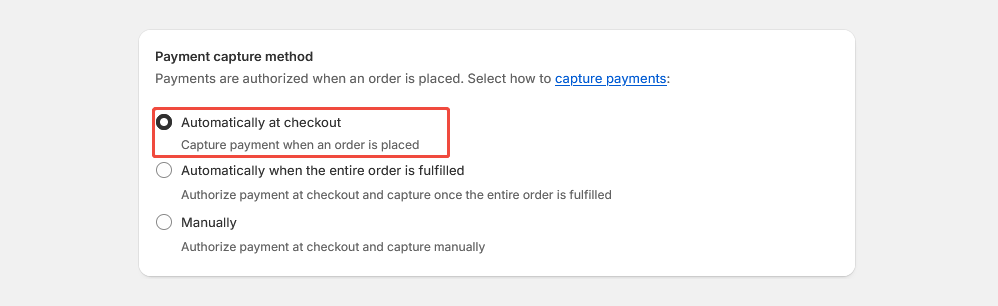
- 默认设置交易为自动授权:【Payment capture method】-【Automatically at checkout】,此时预授权的订单需要在Oceanpayment账户后台进行授权操作。
- 当设置交易为手动授权:【Payment capture method】-【Manually】,此时预授权的订单需要在Shopify后台进行授权操作。
卸载
- 在【Settings】-【Payments】- 找到你需要卸载的支付方式,点击Deactivate。