Overview
Oceanpayment payment pages support custom CSS styling to provide a branded payment experience. Developers can customize the appearance of page elements, such as input fields and buttons, to align with their brand's visual guidelines. This helps maintain a consistent design across the payment page and the merchant's website or application, delivering a more seamless user experience and stronger brand consistency.
Supported Integrations
The following integration types support custom page styling:
Customization Method
Specify the URL of your custom CSS file using the cssUrl request parameter. When the Oceanpayment payment page is loaded, the specified CSS file is automatically imported and its styles are applied to override the default page styles.
Parameter Description
| Parameter | Type | Description |
|---|---|---|
.cssUrl | string | The publicly accessible URL of the custom CSS file. The URL must use the HTTPS protocol and be accessible by Oceanpayment services. |
- The cssUrl value must be a publicly accessible HTTPS URL.
- We recommend hosting the CSS file on a reliable CDN or static file server to ensure availability and prevent style loading failures.
- Custom CSS is applied for presentation purposes only and does not affect payment logic, risk controls, or page functionality.
- We recommend customizing only visual styles, such as colors, border radius, and borders. Avoid significant layout changes to ensure optimal compatibility.
Customizable CSS Classes
Developers can define the following CSS classes in their custom CSS file to override the default styles of the Oceanpayment payment page.
| CSS Class | Description | Supported Properties |
|---|---|---|
.field__input | Card information input fields |
|
.confirm | Payment confirmation button |
|
.cancel | Payment cancellation button |
|
Hosted Checkout
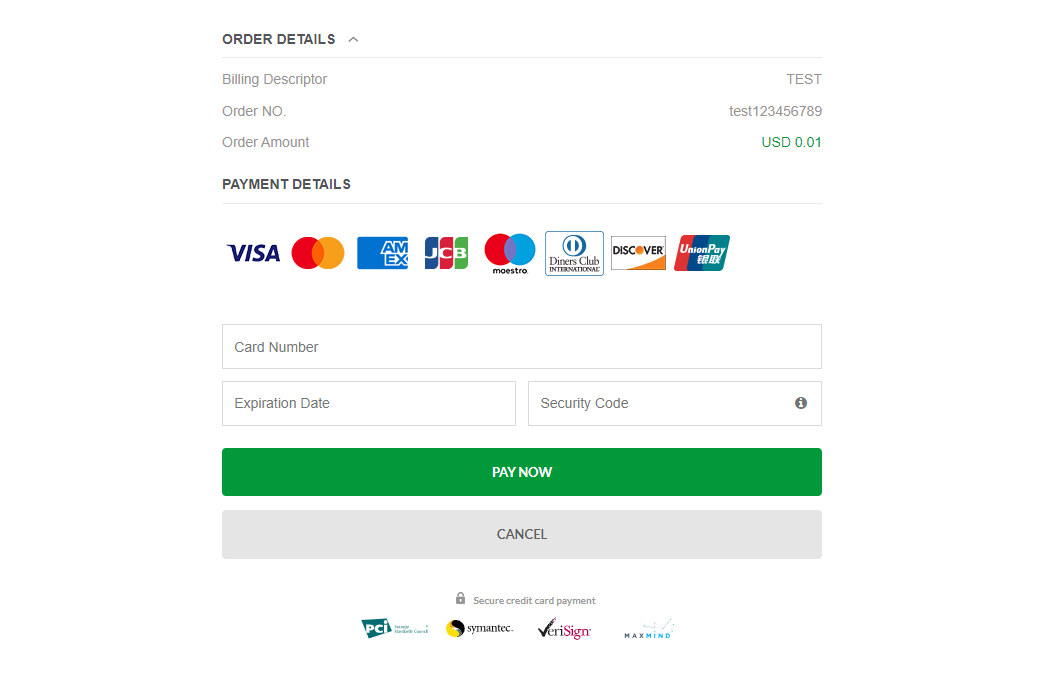
Default Style
Custom Style
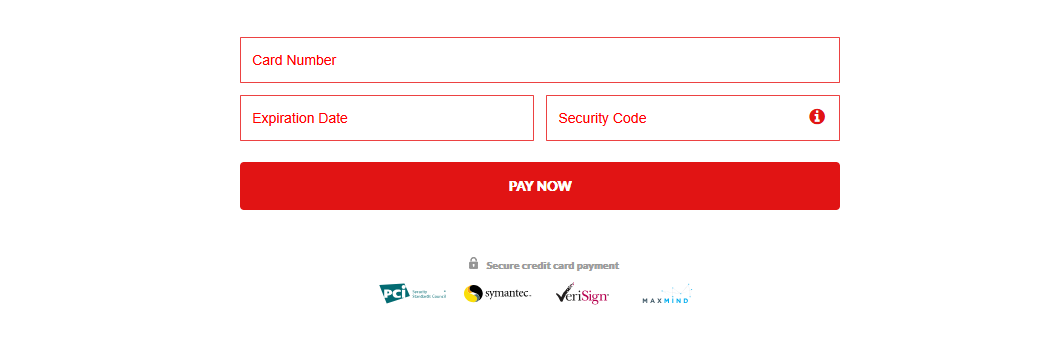
In the Hosted Checkout integration mode, you can specify a custom CSS file by passing the cssUrl form parameter.
- Oceanpayment automatic redirection
<input type="hidden" name="cssUrl" value="https://www.oceanpayment.com.cn/wp-content/themes/oceanpayment/css/style-red.css" />
Embedded Checkout
Default Style

Custom Style
- Credit Card
- Google Pay
- Apple Pay
In the Credit Card Embedded Checkout integration mode, you can specify a custom CSS file using the cssUrl parameter of the Oceanpayment.init() method. When the payment component is initialized, Oceanpayment automatically loads the specified CSS file and applies its styles to the payment page, allowing you to customize the page appearance.
<script>
  $(function() {
      Oceanpayment.init(' ','https://www.oceanpayment.com.cn/wp-content/themes/oceanpayment/css/style-black.css','');
  });
</script>

In the Google Pay Embedded Checkout integration mode, you can customize the appearance of the Google Pay button by configuring the buttonStyle parameter of the onePageGooglePay.init() method.
When the payment component is initialized, the Google Pay button is automatically rendered based on the provided buttonStyle configuration and in accordance with the Google Pay button customization guidelines.
<script>
   $(function() {
        onePageGooglePay.init(true, {
            buttonStyle: {
                buttonColor:'',
                buttonType:'',
                buttonRadius:'',
                buttonSizeMode:'',
                buttonLocale:''
            }
        });
  });
</script>
In the Apple Pay Embedded Checkout integration mode, you can customize the appearance of the Apple Pay button by configuring the buttonStyle parameter of the onePageApplePay.init() method.
When the payment component is initialized, the Apple Pay button is automatically rendered based on the provided buttonStyle configuration and in accordance with the Apple Pay button guidelines.
<script>
   $(function() {
        onePageApplePay.init(true, {
            buttonStyle: {
                buttonstyle:'',
                type:''
            }
        });
   });
</script>